Creating shared objects for use across content areas

Shared objects is the global content area where all objects that are shared across content areas are stored in object containers. If you want to create a category, navigation bar, perspective, style, or custom item type that can be shared across all users and content areas, consider creating these objects in the Shared Objects content area.

Personal folders are also contained in the Shared Objects content area but are created in the Users portlet on the Oracle Portal's home page's Administer tab.

You must be logged on as a portal administrator, a content area administrator, or an authorized user with the "Manage" or "Administer" privileges on the Shared Objects content area to be able to create or edit shared objects. To delete an object contained in a shared object, you must have Manage privileges on the object. For example, to delete a personal folder, you must be the owner of the folder.

To create shared objects for use across content areas:

  1. In the Navigator, click the Content Areas tab.

  2. In the Name column, next to Shared Objects, click Contents to display the Shared Object containers.
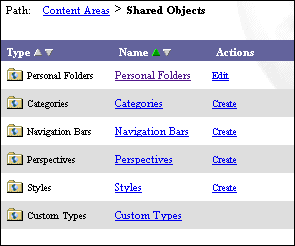
  1. Next to any of the shared object containers, you may perform these actions providing you have the appropriate privileges:

    • Click Create to display the appropriate creation manager. For example, if you click Create next to Categories, the Category Manager displays.

    • Click Edit to display the container's configuration tabs.

    • Click the container link to display its sub-container objects. For example, clicking Navigation Bars displays all the navigation bars that were created and shared across content areas as well as any Personal Folder Navigation Bars. The actions you can perform from this page are Create, Edit, and Delete.

  2. The Custom Types container holds sub-containers for Attributes, Folder Types, and Item Types. Each of these sub-containers hold custom objects that were created by users. The actions you can perform from this page are Create, Edit, and Delete.

  3. Click the object link to display objects created below the custom type. For example, clicking Folder Types displays all custom folder types that were created and shared across content areas. The actions you can perform from this page include Create, Edit, and Delete.

  4. (optional; for content area administrators only) In the Path: Content Areas, next to Shared Objects, you can click Edit Properties to edit the Shared Objects content area. From the Edit Content Area Manager page, you can establish the features and settings that apply across all content areas such as those relating to items, folders, navigation bar labels, pages, translations, and access lists. For more information, see Content area administrator checklist.

Notes

  • Shared object nodes (parent object) cannot be deleted.

  • Personal folders are part of shared objects and cannot be deleted.

Related Topics

What are shared content area objects?
Creating a custom item type
Creating a custom folder type

Adding attributes to a custom item type
Adding attributes to a custom folder type
Creating a personal folder