Oracle Portal lets you enter user-friendly URLs directly in your browser so that you and your users can quickly access pages and content area objects via a logical path name. You can also navigate to your pages and content area objects using the Navigator, Content Area Map, or any of the various managers which you can access from the Content Area Administration page.
Direct access URLs let you share fully formed URLs or relative URLs with other users so that they can quickly access your Oracle Portal objects such as pages, folders, categories, perspectives, and documents.
You can access Oracle Portal objects by entering the appropriate path name in your browser:
|
Object |
URL path name |
|
page |
http://<hostname:port>/<DAD>/url/page/<pagename> |
|
Folder |
http://<hostname:port>/<DAD>/url/folder/<foldername> |
|
Category |
http://<hostname:port>/<DAD>/url/category/<categoryname> |
|
Perspective |
http://<hostname:port>/<DAD>/url/perspective/<perspectivename> |
|
Document |
http://<hostname:port>/<DAD>/docs/<docname> |
where:
-
hostname is the name of the machine on which the mod_plsql Gateway is installed.
-
port is the port number used by the PL/SQL Gateway to transmit data between the database and Web browser.
-
DAD is the name of the Database Access Descriptor which contains your content area. It is the part of the Oracle PL/SQL Gateway configuration that specifies which database to connect to and how.
-
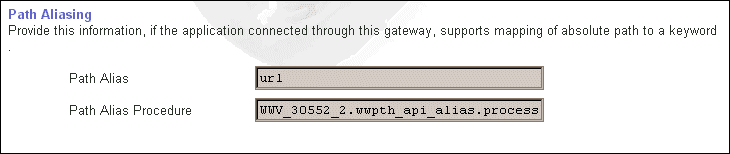
url is the initial default name of the direct access URL (path alias name) which is set in the Listener Gateway Settings page.
-
page, folder, category, perspective, and docs are the object names and they should not be changed.
-
pagename is the name of the page you want to access.
-
categoryname is the name of the category you want to access.
-
perspectivename is the name of the perspective you want to access.
-
docname is the name of the document (item) you want to access.
Direct Access URL rules
The rules for using direct access URLs are as follows:
-
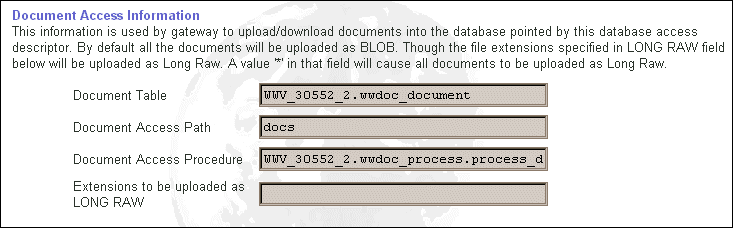
The portal administrator must set the direct access URL in the Path Alias field located in Listener Gateway Settings page from the Services portlet on the Administer tab. In the above example, it has been set to 'url'. Enter this name after the DAD name to indicate that a 'simple URL' follows it. For documents, enter the Document Access Path (docs) instead of the direct access URL.
-
You can navigate to different types of objects by entering the appropriate keyword after the URL unit: for example, page, folder, category, or perspective.
-
After entering the direct access URL, enter the object name. Note that this name is the object's non-translatable base name.
Examples:
-
To access a top-level page, the syntax is:
http://machine:port/DAD/url/page/mypagename/
-
To access a sub-folder a few levels below the root, enter the 'root' folder which is always the same name as the content area. In the following example, the root folder is named "entertainment," and shows the path down to a folder named "concerts":
http://machine:port/DAD/url/folder/entertainment/music/rock/concerts/
-
To access documents in Oracle Portal via a URL --- for example, directly access a document in the concerts folder that was named tour_poster.gif, by entering:
http://machine:port/DAD/docs/folder/entertainment/music/rock/concerts/tour_poster.gif
Note: For documents, the keyword "url" is replaced with the Document Access Path, "docs," on the Listener Gateway Settings page which you can access from the Services portlet.
-
To access a top-level category named online_music in the entertainment content area, enter:
http://machine:port/DAD/url/category/entertainment/online_music/