An Oracle Portal application is a group of integrated components and shared components designed to solve a business need or task. For example, you can create a human resources application that allows users to add new employee information or look up existing employees. The contents of this application could include:
-
a form component to add the new employees.
-
JavaScript shared components that validate entry fields in the form. For example, one JavaScript routine could verify that the employee's social security number is entered in the correct format. Another could ensure that the employee is assigned an ID consisting of 8 characters, all numbers.
-
a Query by Example (QBE) report component to look up and edit existing employee information.
-
List of Values component for the QBE report entry fields that contain company job titles and departments.
-
a link between the form and QBE Report.
To build the above example, you first create the application that will contain the individual components. Then you use the Application Navigator to build the components and tie them together with the link. Any application components (except Frame Drivers, Links and Lists of Values) that you create can be made accessible to Oracle Portal users as portlet.
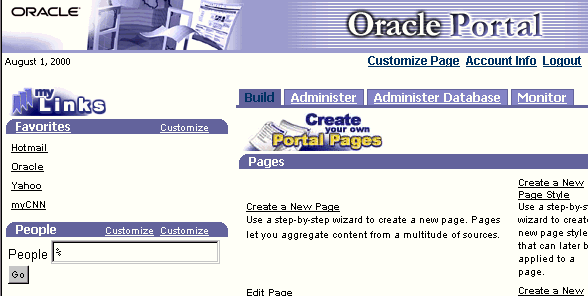
The PEOPLE_APP example application shipped with Oracle Portal 3.0 uses several Portal components to query and display various views a database table containing information about employees in the SCOTT.EMP table. The entry point for the application is a form that displays in a portlet. In the figure below, the People portlet has been added to lower left corner of the Oracle Portal Home page.
Users can search for employees by typing a name in the People field, for example, Clark, then clicking Go. The results are displayed in a report component, as shown below.
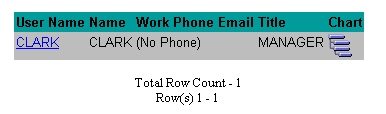
The User Name CLARK and the Chart icon are both both hypertext links to another report containing details about Clark and a hierarchy component, respectively. The hierarchy shows Clark's position in an organization chart. Both components are shown below
|
|
|
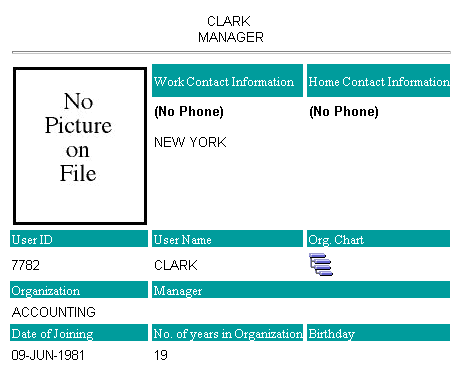
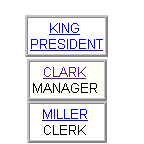
Both links were created using the Portal link wizard.
Building an application
To create an application, you must have the CREATE ALL APPLICATIONS global privilege. You can then grant application-level access privileges to multiple Portal Developers that allow them to create the components in the application. For example, two developers with Edit or higher access privileges on the application could simultaneously work on the form and QBE report in the above human resources application example. Another developer with Create shared component access privileges could build the JavaScripts for validating entry fields in the application.
Applications map to schemas
A schema is a location in the Oracle database where database objects are stored. Every Oracle Portal application maps to a database schema. This enables Oracle Portal to store database objects associated with the application.
When you build a component in Oracle Portal, you must specify the name of an application that will own the finished component. A package will be generated for the component and stored in the database schema that maps to the application.
A component can be part of only one application. Shared components are shared across applications. If you want to reuse a component in another application, you must copy it to the schema that maps to the application.
Inheriting privileges
You can explicitly grant access privileges on the finished component to individual developers or allow them to inherit the privileges of the application. If you choose the latter, for example, any developer with Edit or higher access privileges on the application is automatically granted privileges to edit the finished component.